
Serving heavy websites with Pagespeed above 95 using a single methodology
Many
Frontend Development, Web Design
Full Stack Developer focused on frontend performance
Although I'm a "factory-made" backend developer, I still do a lot of web design work on websites and landing pages, especially after I started working with Rush CMS. The idea behind Rush CMS is for the agency to have a fully dynamic headless CMS, while having the freedom to serve a frontend any way they want.
In my case, that way is optimization:
- The client briefs me on how they want the layout
- I already prepare the mockup with speed in mind
- The client approves it, or makes the changes they want. In this case, the client is king, if they want something heavy on the frontpage, they'll have it. I just warn about performance, provide consulting, and their decision is the final one
- After that, I make every possible optimization for the site to perform
The best approach I've found - by far - starts with Astro and Bun as the base.
Why Astro?
I've already tested several approaches: pure React, Svelte, Tanstack, Next.js, React Router, Gatsby, Hugo... And out of all of them, Astro was the only one built primarily for this approach: websites and landing pages. It doesn't try to embrace the world, nor to serve a wide range of needs. Its main goal is to build websites and landing pages in an optimized way, and that's it. The bundle has a ridiculously small size, and if you need more advanced approaches, you can use whatever framework you prefer inside an island.
If you want to know more, I explain it in detail in this article on my blog, and all my posts about Astro can be read here.
Why Bun?
This one is simpler: speed. In production, nothing changes, we keep using the industry standard. Locally I run bun install up to 10x faster, bun dev and bun run build are faster too (but not that much), and with less startup overhead. It's a difference that makes sense to me. I confess I've even gotten spoiled by it! I miss it when I'm working on a project that doesn't have it.
It's not a rule, it's a convenience I don't see a reason to give up.
And the Methodology?
I've already explained the setup, now I'll explain the mindset. While I detail some sites I have as examples, I'll bring an approach that made the difference in each one.
CTB Brasil
CTB Brasil operates in a market where its front-page needs a lot of photos, its clients need to know everything it does on a single page: what kinds of services it offers, who it serves, what equipment it has for rental, and so on.
The construction industry doesn't have a history of mass adoption of new technologies, running the risk of losing clients because the site is "too modern" is a payoff that doesn't pay off, not even a little. The solution was to bring modernity with a lot of sobriety.
At the time I write this case, the site's homepage has more than 50 images and a Pagespeed score of 97.
What made the difference: with the exception of what's shown above the fold, every image has: explicit
height/widththat will tell the browser the exact dimensions of that image (this matters more than it seems);loading="lazy"defers the image loading (mandatory in this case), they only load when the user scrolls to them;decoding="async"allows the browser to process them in the background, preventing them from blocking the rest of the html code from being processed.
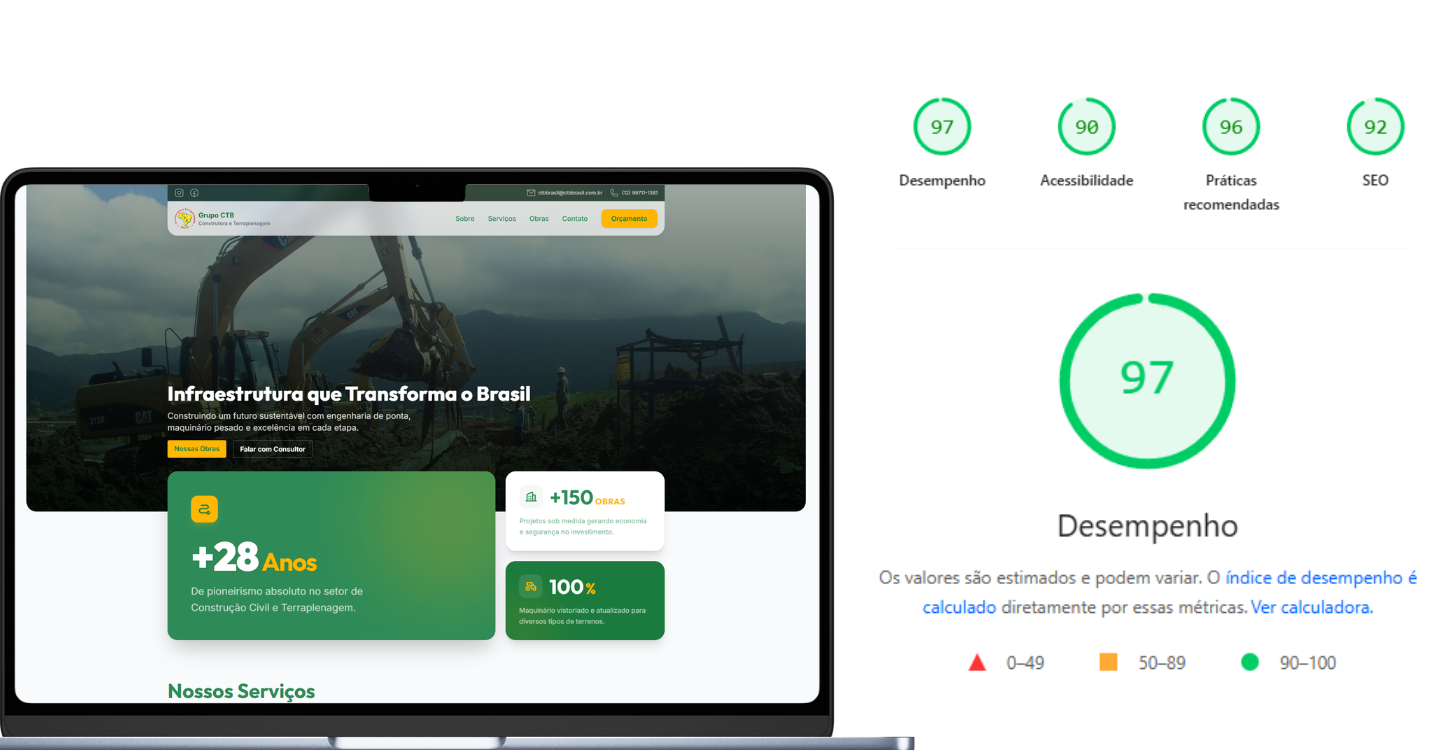
As I said at the beginning, the content above the fold - what the user sees first, as soon as the page opens - is the opposite of what I did on the rest of the site. No loading="lazy", this image actually needs fetchpriority="high" (it tells the browser that's the most important image on the page, and loads it with priority). And when the project allows, a <link rel="preload"> in the <head> to start the download even before the parser reaches the tag. Not using these best practices will rip at least 10 points off your score!
Mega Model Sul
Mega Model Sul doesn't use Rush CMS, but connects directly to an internal platform that provides the site's information and captures leads. This project brought a different challenge, the hero is a video, but one I can't optimize the way I'd like. The reason? when phones like the iPhone are on low battery, Safari doesn't run the video's autoplay in the background. For the owners, that autoplay has to happen, no matter what.
The solution was to sacrifice some performance points and deliver the best possible, remember: serving the client is mandatory, and only after that should I reach the best possible result. Instead of using the standard, optimized video, I converted it to animated webp, which in practice is a gif, but technically is a compression and packaging of several frames into a single file, in a more modern way. I used ffmpeg with libwebp to grab the frames and generate the files automatically.
This approach tricks the browser into displaying the video, regardless of whether the world is ending or the browser doesn't want to. I tested several different options to find the lightest possible file with the most appropriate framerate.
What made the difference: The project is an Astro SSR, the page is rendered on the server, but the APIs that feed the interactivity - state listing, cities, model search - return with aggressive
Cache-Control(max-age=86400for stable lists,stale-while-revalidate=3600for the search), so the browser and the CDN absorb most of the load. For the interactive parts themselves - search, filters, gallery - I used Preact with compat layer, which delivers the same React API at about 1/10 of the bundle size. Each interactive component becomes an island hydrated on demand, so the user only pays the JS cost for what they actually use. The animated webp steals the show, but it's the combination SSR + cache on the APIs + islands with Preact that sustains the Pagespeed even with the "cheated" video in the hero.
Padaria Esquina do Pão
Padaria Esquina do Pão is a well-known bakery in Caraguatatuba - SP that has a website with an online menu. The challenge here was different from the others: the menu needs to be always up to date. A product that ran out has to disappear, a new price has to show up, a seasonal item comes and goes. The owner can't wait for build, deploy and cache invalidation every time he touches the menu.
For static sites this is usually a problem: either you "rebuild" the site on every change (slow), or you serve everything dynamic and lose performance. The solution was a middle ground: Astro in SSR mode with webhook revalidation.
What made the difference: the site runs in SSR via
@astrojs/node, and Rush CMS responses sit in an internal cache indexed by key (each listing, each entry, each menu). When the client edits something in the CMS, an authenticated webhook hits the/api/revalidateendpoint with the key of what changed - if a specific key comes in, it invalidates only that one; if it comes in empty, it invalidates everything.The user gets the page in a few milliseconds with a warm cache, the owner sees the change live quickly, and nobody needs to rebuild anything. I also configured
envFieldwith a validated schema inastro.config.mjs, so missing or malformed environment variables break at build time, not in production, a safety net that avoids that classic "works locally but not in production".
Pórtico Reformas
Pórtico Reformas works with high-end and luxury residential renovations in Porto Alegre, it looks like an institutional site but delivers its own system of landing pages to serve the main niches.
Specialty pages like Condomínio Premium and Reformas em Apartamento deliver what's needed for the client, SEO and agents. All of them with automatically generated thumbnails and components in .astro block format, making it possible to generate dozens of specific pages for a type of service, area of operation, location or niche with the same technical quality.

The project involves several axes, the main one being: an SSG site with dynamic content provided by Rush CMS (with a contact form integrated with the system) and dynamic generation of Open Graph images for each specialty in the portfolio.
What made the difference: I used
satoriwith@resvg/resvg-jsto generate OG images at build time from a JSX template, with the hero of each specialty as the background, badge, title and CTA rendered on top. The result is a 1200x630.jpgper specialty, served withCache-Control: public, max-age=31536000, immutable. When someone shares a link on WhatsApp or Facebook, the preview is generated once and cached forever, without anyone having to open Photoshop or any other image editing program.On the frontend, the gallery uses
photoswipeloaded as an island: the gallery'sjsonly downloads when the user clicks to open a photo. The rest of the page remains pure static HTML, and the Pagespeed thanks me.
Lessons Learned
The most important thing I've learned - and keep learning - building sites for Rush CMS and for Mega Model is that performance is not a goal, it's a consequence. You can't open a new project and say "I'm going to score Pagespeed 100", you open it, understand what the client needs, and from there you choose which tool to use for each problem.
And that's why a different stack is never a problem. CTB, Mega Model, Esquina do Pão and Pórtico have completely different needs and each one solved its challenge in its own way, but the mindset is always the same: only load what's needed, when it's needed, and in the lightest way possible. Astro gives me the flexibility to do that without fighting the tool, and that's why it becomes my starting point on every new website or landing page project.